AI Image Prompt Generator

Turn an image idea into a model-ready description and separate settings suggestions with our image prompt optimizer. PromptWizz writes prompts; it does not generate or test images.

Guidance checked 2026-10-20. Editorial guidance.

Editorial suggestions, not confirmed vendor limits.

0 / 10,000

Optimization depth

Intermediate and Complex are available on Starter and Pro.

Text, image, and video share one allowance.

Saved image comparisons

Handmade mug product photo

Original

Prompt preview

product photo of a handmade ceramic mug on a kitchen table in the morning

Saved output
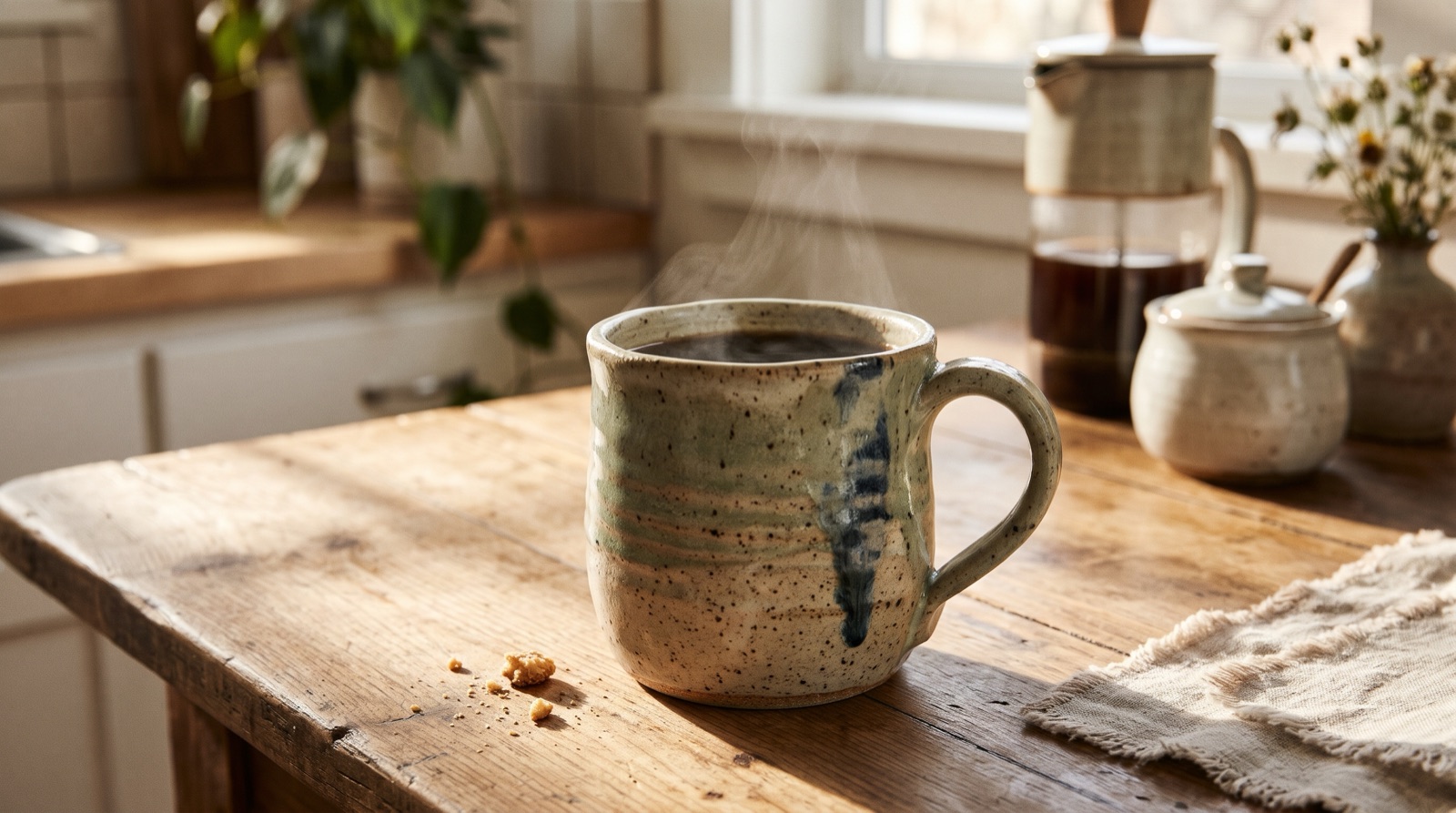
A speckled handmade mug of steaming coffee on a wooden kitchen table, surrounded by a plant, a French press, a sugar pot, a cloth and crumbs, in morning sunlight.

Optimized

Prompt preview

Create a realistic product photograph of a handmade ceramic mug resting on a wooden kitchen table in the early morning. The mug has a softly glazed finish with subtle, organic vari…

Show full Optimized prompt

Create a realistic product photograph of a handmade ceramic mug resting on a wooden kitchen table in the early morning. The mug has a softly glazed finish with subtle, organic variations in the glaze and a slightly imperfect hand-thrown shape, with a sturdy handle catching a gentle highlight. Soft, warm sunlight streams in from a window at the side, casting a long, delicate shadow across the tabletop and bringing out the texture of the clay. The mug sits slightly off-center in the frame, photographed at a gentle three-quarter angle at eye level with a shallow depth of field, so the softly blurred kitchen background of pale walls and a few muted objects stays calm and does not compete with the product. The palette is warm and inviting, with creamy neutrals, honey-toned wood, and one gentle accent color in the glaze. The overall style is clean, natural lifestyle product photography with a cozy, unhurried morning mood and no visible text or logos.

Saved output
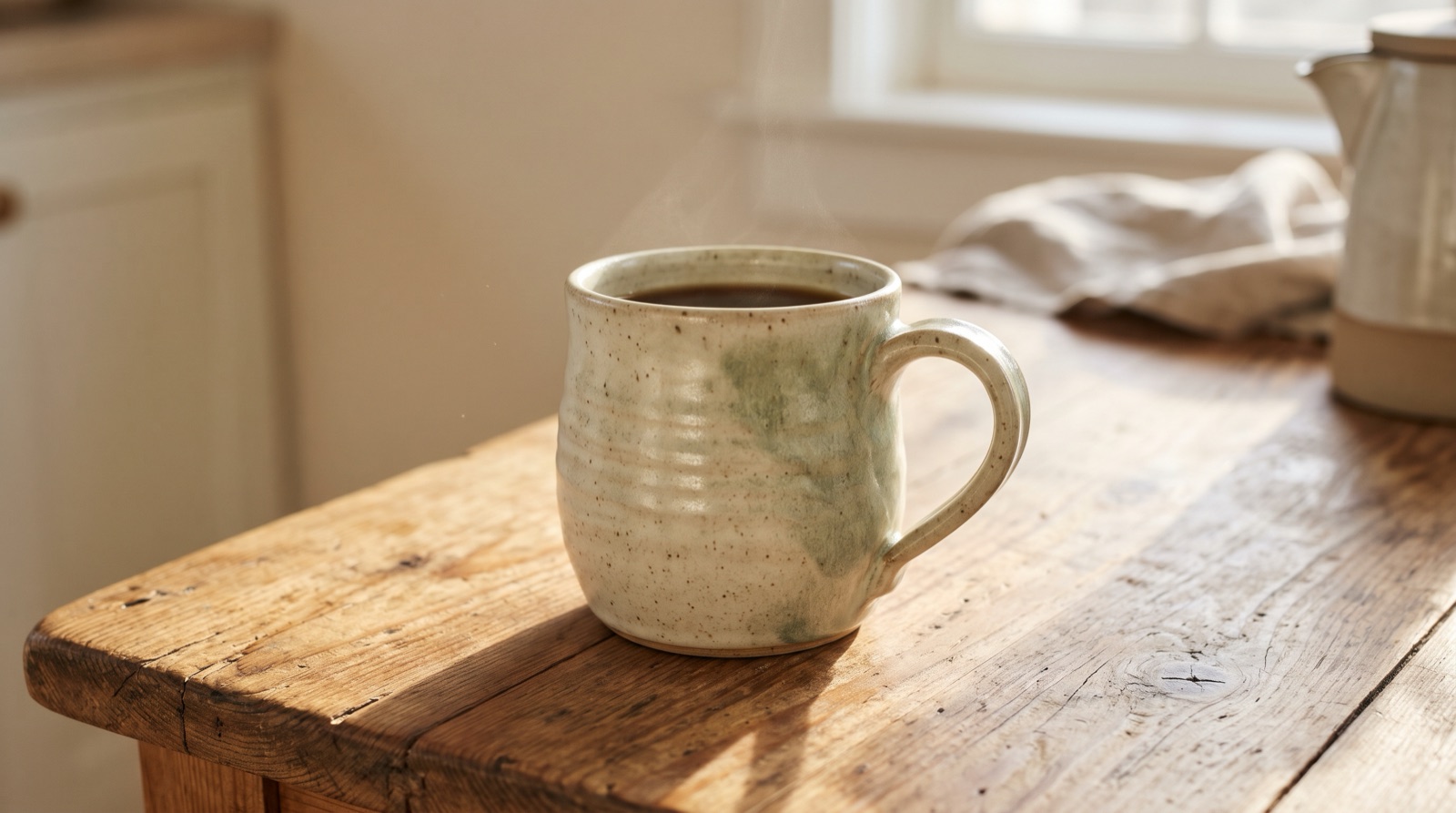
A speckled cream handmade mug with a soft green glaze on a wooden table, set off-center in side light with a long shadow, in front of a blurred pale kitchen.

What changed: The optimized prompt asked for a realistic product photograph: a softly glazed, hand-thrown mug with one accent color, side window light with a long shadow, an off-center three-quarter view at eye level, and shallow depth of field so the pale kitchen and a few muted objects behind it stay soft, with no text or logos.

Google · Gemini app (Gemini 4 Argon selected) · Image model version not shown by the app · 2026-11-01. Saved example · Results vary.

Comparison details

Selected demonstration, not a benchmark. Both outputs use the shared output model and settings below.

PromptWizz target
Nano Banana 2.1 / Gemini image
Framework or profile
Nano Banana image profile (auto framework)
Complexity
intermediate
Optimized on
2026-10-28
Output provider
Google
Output model
Gemini app (Gemini 4 Argon selected)
Output model version
Image model version not shown by the app
Generated on
2026-11-01
Shared settings
  • output size: 2752 × 1536 (same on both sides, chosen by the app)
  • aspect or quality controls: App defaults on both sides
Selection
First result for both sides, each prompt in a fresh chat
Rerolls
Original: 0 · Optimized: 0
Post-processing
Resized to 1600 px wide and re-saved as JPEG for the web; no other edits
Limitations
One run per side in the consumer Gemini app, which may rewrite prompts internally. A selected demonstration, not a benchmark.
Try your image prompt

Lighthouse in a storm

Original

Prompt preview

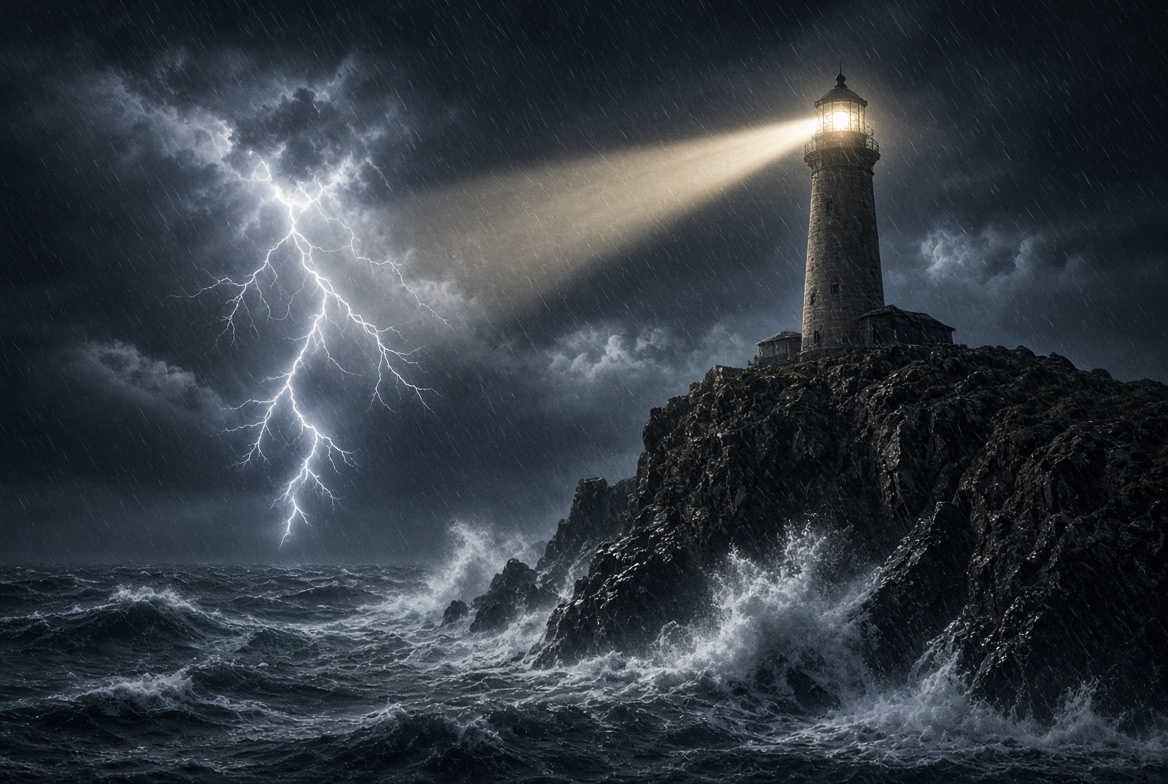
a lighthouse on a rocky coast during a storm, dramatic

Saved output

A stone lighthouse on a dark cliff sending a beam through heavy rain, with a lightning bolt over a churning night sea.

Optimized

Prompt preview

A tall white lighthouse with a red lantern room stands on a jagged black rock outcrop at the edge of a stormy coast, its base streaked with sea spray and wet stone. Enormous grey-g…

Show full Optimized prompt

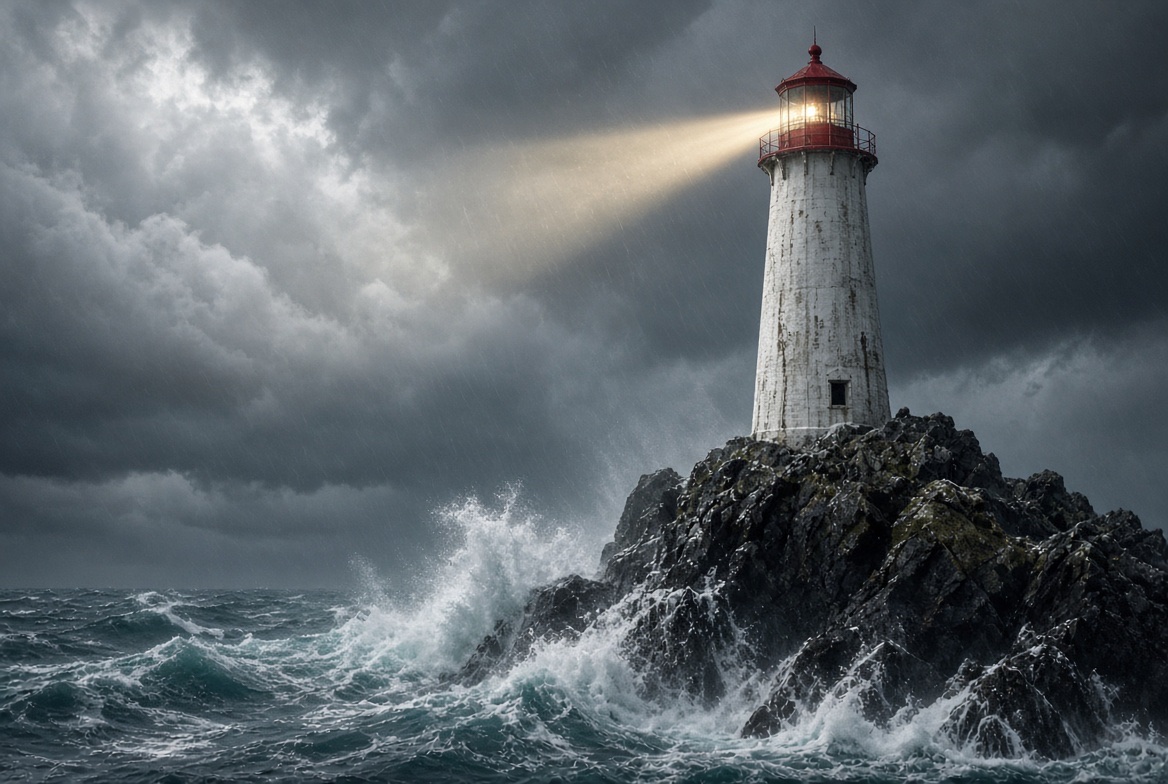
A tall white lighthouse with a red lantern room stands on a jagged black rock outcrop at the edge of a stormy coast, its base streaked with sea spray and wet stone. Enormous grey-green waves crash against the rocks in the foreground, throwing white foam high into the air, while a dense bank of dark charcoal storm clouds fills the sky behind the tower. The image is a cinematic photograph shot from a low, slightly angled viewpoint looking up at the lighthouse, with a wide frame that keeps the full tower, the rocks and the breaking waves visible. A single warm beam of light sweeps from the lantern room through rain and mist, while pale, diffused storm light from the upper left hardens the highlights on the wet rock and the white tower. The palette contrasts the lighthouse's bright white and red against the deep slate sky and the cold teal of the churning water. The lighthouse sits slightly right of center with open stormy sky on the left, and the crop is held wide with the tower fully in frame, matching the low angled viewpoint.

Saved output

A weathered white lighthouse with a red lantern room on black rocks, its beam crossing grey storm clouds as teal waves break below, seen from a low angle.

What changed: The optimized prompt pinned down the specific shot: a white tower with a red lantern room on black rock, waves breaking in the foreground, a low, slightly angled viewpoint, one warm beam through rain, pale light from the upper left, a white-and-red against slate-and-teal palette, and a wide crop with the tower right of center.

xAI · Grok app (Grok Imagine) · Version not shown by the app · 2026-11-01. Saved example · Results vary.

Comparison details

Selected demonstration, not a benchmark. Both outputs use the shared output model and settings below.
PromptWizz target
Grok Imagine Image 2.0
Framework or profile
Grok Imagine image profile (auto framework)
Complexity
intermediate
Optimized on
2026-11-01
Output provider
xAI
Output model
Grok app (Grok Imagine)
Output model version
Version not shown by the app
Generated on
2026-11-01
Shared settings
  • output size: 1168 × 784 (same on both sides)
  • other controls: App defaults on both sides
Selection
First result for both sides, each prompt in a fresh chat
Rerolls
Original: 0 · Optimized: 0
Post-processing
Re-saved as JPEG for the web at the original size; no other edits
Limitations
One run per side in the consumer Grok app; whether the app uses the same model as the documented Grok Imagine API is unverified. A selected demonstration, not a benchmark.
Try your image prompt

2 examples shown

Pick your model

How to improve an AI image prompt

Start with the subject and the visible action. Then say where it belongs in the frame, which medium you want, and which lighting or colors matter. Quote any exact words to render, including their placement and typography. Add constraints that protect counts, relationships, or an edit you want to keep unchanged. Leave out detail that does not serve the image.

Subject and composition

Medium and light

Text and constraints

How prompts differ by image model

Model profiles keep the prose, tag syntax, command flags, and destination-tool settings separate. Each check date applies only to the stated evidence scope.

Midjourney V8.2

Describe the main subject and context in concise prose. Keep exact rendered text in double quotes. Put all command parameters in the separate parameters field. Use a style reference only when the user supplied it. Do not invent quality tags, reference codes, or deprecated reference flags.

Checked 2026-10-20: selected command parameters. Source.

V8.2 reference workflows differ from older Midjourney versions; only a user-supplied style reference is supported here.

GPT Image 2.5

Use short labeled sections in this order: Scene, Subject, Details, Constraints, Use. Preserve exact text in quotes and specify typography when relevant. Keep size and quality in settings. For edits, distinguish the requested change from the elements to preserve.

Checked 2026-10-20: labeled prompt sections. Source.

Choose size and quality in the destination tool; these are suggestions, not applied settings.

Nano Banana 2.1 / Gemini image

Write connected narrative sentences, beginning with a clear creation or editing verb. Cover subject, action, context, composition, and style. Describe the desired positive scene. Preserve user-described reference relationships without claiming to inspect images.

Checked 2026-10-20: narrative and positive prompting. Source.

Pro is a related variant; these hints are scoped to 2.1.

FLUX 3 Image

Organize the description as medium, subject, setting, light, and framing. Front-load the most important visible detail. Use positive descriptions and concise concrete language. Omit generic quality tags and unsupported negative syntax.

Checked 2026-10-20: medium-first prompting. Source.

No negative prompt field or layout-coordinate generation in this workflow.

Stable Diffusion / SDXL tag style

Write concise subject-first tags or short phrases, followed by setting, composition, lighting, and style. Put task-specific exclusions in the separate negative field. Avoid generic negative blobs. Do not invent weights, embeddings, LoRA names, or checkpoint-specific settings.

Checked 2026-10-20: UI-dependent separate negative field. Source.

A1111-compatible tag guidance is UI and checkpoint dependent; it is not general SD3.5 syntax.

Ideogram 4.0 — prose / Magic Prompt

Write a clear natural-language design brief for the Magic Prompt workflow. Put exact requested text and its typography early, followed by composition, visual style, and palette. Do not emit the open-weight JSON caption format.

Checked 2026-10-20: text-first prose and Magic Prompt. Source.

Aspect ratio is a suggestion to confirm in the destination UI; this profile does not claim 4.5 compatibility.

Grok Imagine Image 2.0

Write four to six flowing sentences for one image. Start with the subject, its form or state, what supports it, and the setting; then add details with explicit counts and the viewpoint, art direction, the light's source, direction and hardness, separate subject and background colors, and the crop. Repeat the viewpoint when describing composition, and describe materials and states positively.

Checked 2026-11-01: subject-first prose, explicit counts, positive materials, and chat-tool prompt authorship. Source.

The Grok app may differ from the documented API model and settings; in xAI's developer API chat image tool, the chat assistant writes the image prompt.

Generic image

Write a portable visual brief covering the important subject, composition, medium, light, and constraints. Use no vendor-specific syntax or claimed model limits.

Checked 2026-10-20: editorial, not vendor-confirmed.

Editorial suggestions, not confirmed vendor limits.

One idea, several model-ready prompts

Coffee shop illustration

Starting idea: A cozy coffee shop.

Midjourney

Warm editorial illustration of a small neighborhood coffee shop at dusk, two customers at the window counter, amber pendant lights, espresso machine as the focal point, open space above the window for a headline.
--ar 4:3 --s 100

Portable description

An editorial illustration of a neighborhood coffee shop at dusk. The espresso machine anchors the foreground; two customers sit at the window counter. Warm amber pendant lights and uncluttered space above the window leave room for later text.

Typography poster

Starting idea: A poster that says OPEN LATE.

Midjourney

Minimal street poster with the exact words "OPEN LATE" in large white condensed sans-serif lettering centered on a deep navy field; high contrast and generous margins.
--ar 2:3 --raw

Portable description

Design a minimal portrait poster. Render exactly "OPEN LATE" in large white condensed sans-serif type, centered on a deep navy background, with generous margins and no added copy.

These are authored examples, not generated or rendered results. The Midjourney command line follows the description.

Aspect ratio, size, and quality are different controls

Aspect ratio describes the frame shape. Size chooses pixel dimensions, and quality may choose a model-specific processing level. Midjourney accepts an inline --ar flag. GPT Image and other destination tools expose settings separately; a sentence in the prompt does not apply those controls for you.

Negative prompts: when to use a separate field

The Midjourney profile adds a single --no suffix when useful. The A1111-compatible Stable Diffusion tag workflow has a separate negative field. The other launch profiles favor positive descriptions that preserve the intended exclusion without reversing it.

What the score means

The image rubric checks subject clarity, composition, medium, lighting, constraints, fidelity, and model syntax. It scores the original and rewritten prompt independently. A lower or unchanged score is possible; no score predicts the image you will get.

Frequently asked questions

Is this image prompt optimizer free?

Yes. An anonymous visitor gets one shared optimization per 24-hour window. A free account gets three; Starter gets 25 and Pro gets 1,000. Text, image, and video use the same allowance.

Does PromptWizz generate images?

No. It writes image prompt text and suggests settings to choose in the image tool. You render the image there.

Can I use it as a Midjourney prompt generator?

Yes. For Midjourney specifically, use our dedicated Midjourney Prompt Generator, which adds V8.2 tips and templates.

What replaced DALL-E?

GPT Image is the current OpenAI image family for new work. DALL-E is historical terminology, so this tool offers a GPT Image profile.

Which models support negative prompts here?

Midjourney uses a derived --no suffix. The scoped A1111-compatible Stable Diffusion workflow uses a separate negative field. Other launch profiles use positive-first descriptions.

Should I paste size and quality settings into the prompt?

Usually no. Copy the image description as prompt text and select size or quality in the destination tool when that setting exists.

Can I use reference images?

Describe the intended relationship to a reference here, then attach the actual image in the destination tool. PromptWizz cannot inspect or upload it.

Does a higher score guarantee a better image?

No. The score checks how clearly the prompt specifies the task and fits the selected workflow. It is not a render-quality measure.

Are image optimizations counted separately from text?

No. Text, image, video, and extension optimization share the same daily allowance.

More tools and reading

Try the video prompt optimizer, text prompt optimizer, or text prompt checker. Browse templates, plans, and our PromptPerfect comparison.

Background guides: Midjourney prompting (includes older V6 advice) and prompting across models (includes historical DALL-E references). Use this page for the current launch profiles.

    llms.txt